Documentation
Guide made by LostBrickPlacer. Ask in discord if you run into any issues with installing the mod or modpack. We have a listing on CurseForge and Modrinth for our Voice Chat Modpack. You do NOT need the mod or modpack to play on our servers.
Installing the mod
Fabric (Vanilla Launcher)
- Install Fabric
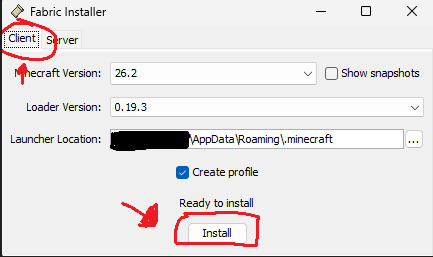
- Select Fabric as the installation
- Run the game once to generate the \mods folder
-
Close the game
-
Download Simple Voice Chat
- Press ⊞ Win + R
- Enter %appdata%.minecraft\mods and hit OK

- Move the voicechat-fabric.jar file into the \mods folder (the one you are currently in)

Modrinth Launcher
- Download the Modrinth App
- Search for
BareBoneson the Discover Content tab - Install BareBones VoiceChat by
nomanasendhelp

- Launch the modpack

Voice Chat Configuration
- Join the server
- Press
Vto follow Setup Guide- Pressing V will open the settings menu once you finish with Setup

- Pressing V will open the settings menu once you finish with Setup
- You can change keybinds for mute/deafen/etc in your game settings under
Controls > Key Binds... > Voice Chat
