Documentation
On This Page
- Basic Features
- Vanilla Tweaks
- Armored Elytra
- Fast Leaf Decay
- Husk Sand
- Auto Replant & Smart Hoes
- Silence Nametags
- Wood Stonecutter & Log Stripping
- Shapeless Portals
- Slime Bucket
- Advanced Shears
- Better Ladders
- Trowel
- Cauldron Mixer
- Universal Bonemeal
- Craftable EXP Storages
- Buried Treasure Compass
- Mob Drops
- Hidden Armor
- Image Maps
- HeadDatabase
- Tool Stats
- Crop Trample Protection
- Custom Ender Dragon
- Shop Plugin Tutorial
- Custom Homes Plugin
- Vote Shop
- Miscellaneous Features

You must be 18 years old or older in order to play on this server. Whitelist applications are all handled through our discord, join at https://discord.gg/barebonesmp.
Basic Features
Mailboxes
- You can now craft red/green/blue mailboxes to place at your base, which through the Mail Bins found at spawn, you can send items or blocks to player's mailboxes from spawn!


Daily Bounties
- Complete random tasks every day for a chance to earn some Diamonds in return! A new task will be assigned every day at 10:00AM Central Standard time.
Per-Player Structure Loot
- All structure loot chests/barrels are per-player instanced, meaning everyone is able to loot the same structure without having to worry about someone else already looting it. You can tell it's an instanced loot chest as the top left text of the chest will be red!
Dungeons and Taverns Loot
- We are currently running a datapack on this server called Dungeons and Taverns which introduces some new structures, and some new enchantments. We currently have 2 of their new enchantments disabled as they cause issues with our anticheat; namely
Outreach and Traveler.
Chest/Inventory Sorting
- We have a server side mod which allows you to automatically organize your inventory or chests with a click of a button. You can configure this at
/chestsortor/invsort(same menu).
Interaction Visulizers
- We have custom animations for somethings in our server, which can be seen as you play. You can customize all of these unique animations using the
/iv togglecommand and their subcommands.
PVP Toggle
- You can enable/disable your PVP status anytime you wish using the command
/pvp toggle. By default, everyone's PVP mode is disabled. Use this if you wish to fight other players who have their PVP enabled. Players with PVP enabled are designated with a red sword icon above their nameplate.
Gravestone System
- All player deaths on our server are pretty protected. Every time you die you'll generate a gravestone at your death location and you'll also be notified the coordinates in chat. You'll have 1 hour to get back to your grave before your items are dropped and normal Minecraft mechanics work. You can unlock your grave so others can access it by doing
/graves unlock. By default, no one can access your grave in a normal death, but in a PVP death, your killer can access your grave.
Vanilla Tweaks
Armored Elytra
- Craft an armored elytra by combining your chestplate and an elytra in an Anvil. They will combine enchantments, and retain armor trims from your chestplates if you decide to split them later. Splitting an armored elytra is as simple as dropping an anvil on it.

Fast Leaf Decay
- Tree leaves will decay faster off freshly chopped trees, still dropping their normal loot.
Husk Sand
- Husk mobs will drop 1-3 sand blocks each time they die, as a simple, farmable renewable source of sand. Desert Temples will only spawn husks mobs in their bounding boxes, as a way to create husk farms easily.
Auto Replant & Smart Hoes
- Right clicking a fully grown crop will harvest it and automatically replant the seeds. You can also use Hoes to quickly harvest and replant crops in a 3x3 area, and can also be affected by the Fortune Enchantment.
Silence Nametags
- Renaming an entity with a nametag
Silencewill silence the entity completely. Works with mobs, minecarts, any entity really. You can use a shears to remove the nametag to enable their sound again.
Wood Stonecutter & Log Stripping
- You can put wood blocks into a stonecutter to make their wooden counterparts or strip them. More often than not, this can also save you wood in the long run.

Shapeless Portals
- Using obsidian or crying obsidian, you can make nether portals in any shape you want, as small as a 1x1 or as big as a 25x25.
Slime Bucket
- Capturing a small slime in a bucket will give you a Slime in a Bucket item, which will bounce in your hand when you're standing in a Slime chunk!

Advanced Shears
- Right clicking item frames with shears will turn them invisible, and can be used to retrieve nametags back from mobs.
Better Ladders
- Shift right clicking a ladder with an empty hand will instantly take you to the top/bottom of that ladder, and shift right clicking a ladder will also automatically build it downwards as far as it can go, allowing you to descend from heights safely.
Trowel
- A trowel is used to randomly place blocks from your hotbar automatically.

Cauldron Mixer
- Dropping concrete powders, dirt, and copper blocks into a water cauldron will automatically convert them into their respective item or oxidation tier.
Universal Bonemeal
- You can use bonemeal on sugar cane, nether warts, and cactus to grow them faster. You can also grow them from a dispenser.
Craftable EXP Storages
- Craft an Iron, Gold, or Diamond tier EXP bottle to store your extra experience. You can also repair your worn armor or items while holding your bottle and using
/bbt repairall


Buried Treasure Compass
- Found in shipwreck chests in place of maps, you use it to locate the nearest buried treasure. It'll break once you've arrived at the location.


Mob Drops
- Mobs have a small chance to drop their heads when killed, and can also have a rare chance of dropping highly collectable items from a special drop table.
Hidden Armor
- Using the command
/armor toggleyou can hide all your worn armor to show off your skin!
Image Maps
- Supporters are able to upload any image onto a map and display them in-game with the
/imageframecommand.
HeadDatabase
- Search a Head database for any cosmetic head items you wish to use for your builds. Use
/hdb searchto search for keywords or blocks, or/hdbto open the user interface.
Tool Stats
- Tracks various statistics about your tools, armor, and weapons such as kills, damage, craft dates, and more.
Crop Trample Protection
- Farmland crops cannot be trampled by players anymore. Unplanted farmland acts like normal and can be trampled back into dirt.
Custom Ender Dragon
Our server uses a custom Ender Dragon plugin whose dragon difficulty scales based on the number of players on the End island, or by stacking dragon eggs on the pillar of the fountain in the middle.
Dynamic Dragon Scaling
- Scales dragon difficulty based on the number of players (2-10 players)
- Adjustable health, damage, and resistance scaling
- Progressive difficulty tiers from "Lone Dragon" to "APOCALYPTIC DRAGON"
- Use dragon eggs on the end fountain to scale the dragon even more for harder fights!
- A unique reward system to reward players based on dragon scale and damage leaderboard placements
- Special attack mechanics that scale in damage and difficulty as the dragon tier increases
Special Attacks
- Lightning Strikes
- Warning system with customizable messages and sounds
- Scaled pattern based on dragon level
- Configurable cooldown and damage
- Ghast Fireballs
- Multiple fireball patterns
- Scaling damage and explosion radius
- No terrain damage option
- Enhanced Dragon Breath
- Customizable damage and radius
- Duration scaling with dragon level
- Progressive effects based on difficulty
Status Effects System
- Unique combat effects including
- Weaknes
- Slowness
- Levitation
- Darkness
- Configurable duration and intensity
Reward System
- Tiered reward system (Common - Rare)
- Damage-based leaderboard
- Customizable loot tables
- Special rewards for top damage dealers
- Progressive reward scaling with dragon difficulty
Shop Plugin Tutorial
- Users can create Shop chests for their shops which allow players to buy/sell their items easily, while also being able to easily locate items in stock and even see items being sold via our new Website integration!
- Shops are simple, requiring just 4 emeralds and a chest in a crafting table to create a Shop item. Placing the Shop will open a Setup GUI where you can set the price, stack amounts, and shop name as well as configure some extra things such as disabling the shop holograms, or changing their sizes. You can also craft shop chests using Barrels instead of a chest.
- Shop chests will only sell the items inside their inventory for the price you've set, so if you set a Shop chest to sell things for 2 diamonds, each stack of item inside the Shop(unless configured differently) will cost 2 diamonds.
- You can upgrade your Shop to be a double chest inventory while still appearing like a single chest by using another Shop Chest item on an existing shop!
Shop Trust System
- You can add players to your trust system to be able to edit your shop's stocks, and edit the shop's settings.
Shop Vaults
- You can create a shop vault which all of your earned money will be stored instead of it being sent to your inventory. Trusted players can also open and withdraw money from your shop vault if you give them access with the trust system.
Shop Commands
- '/shop trust/untrust' - Add and remove players from your shop's trust.
- '/shop search' - Find an item to see if it's being sold by a shop, the stock, price, and location!
- '/shop help' - the help command for basic information regarding the shops.


Shop Logs
- Players can also see transaction logs of their own shops by looking at them and doing
/shop log.

Custom Homes Plugin
- BareBones uses a custom made home plugin that bases all player's homes off the beds they sleep in.
- By default, all server members start with only
1 homebut can buy more from the vote shop to unlock a total of3 homesthat they can have. - Supporters on the other hand, start with
3 homesand can unlock up to9 total homesfrom the vote shop. Supporter Plus start with6 homes. - For members, there will be a 5 second delay to teleport to your home, and a 60 second cooldown between each use. Nitro/Supporters bypass both cooldown and delay and can teleport instantly.
- Each home unlock costs
35 vote points, or about 1 week straight of voting. They can also be sold at shops around spawn for various prices. - View your homes by typing
/homesin-game or/homebeds gui.


- You can rename homes, delete homes, and color code your beds within the
Homes GUI. - Deleting a home can be done by either breaking the bed, or renaming the home to 'delete' using the rename feature.
- You can also bypass the GUI menu entirely by directly teleporting to your beds using the '/beds homename' command.
- Want to have homes in the end or the nether? Instead of using a bed(which explodes) use a compass on a lodestone to set your home in those dimensions. They work the same as normal beds, but display as a lodestone. This consumes the compass on success.
Vote Shop
The Vote Shop can be found on an interactable item frame at Spawn.

Bedrock Breaker
Price: 8 points
- Reward that allows you to break 5 pieces of bedrock on the Nether roof.

Experience Bottle
Price: 3 points
- One time use experience bottle that grants 10 experience levels instantly upon use.
Home Voucher
Price: 35 points
- A voucher which unlocks another /home bed slot.
Diamond
Price: 2 points
- A diamond.
Sponge
Price: 3 points
- Dry sponge block.
Player Skull
Price: 2 points
- Gives a custom player skull of your own skin. Can be worn by players or placed as decoration.
Ancient Debris
Price: 3 points
- It's ancient debris
Timber Axe
Price: 15 points
- A custom, unenchantable iron axe that can instantly chop trees. Lasts for ~50 trees before breaking.
Shrink Potion
Price: 3 points
- A custom potion that shrinks your player model scale to 75% of default player height.
- Not a stackable item.
Normalize Potion
Price: 3 points
- A custom potion that resets your player height to the default 2 blocks.
Growth Potion
Price: 3 points
- A custom potion that grows your player model scale to 125% of default player height.
- Not a stackable item.
Miscellaneous Features
Superior Mobs
Superior Mobs are mobs that have a small chance to spawn around you as normal mobs do. They are slightly buffed in stats, and can have various potion effects applied depending on their rarity! there are 5 tiers of Superior Mob rarities, and more potion effects are applied per tier.
- Common (blue)
- Uncommon (dark purple)
- Epic (red)
- Rare (dark green)
- Legendary (gold)

Tool Trims
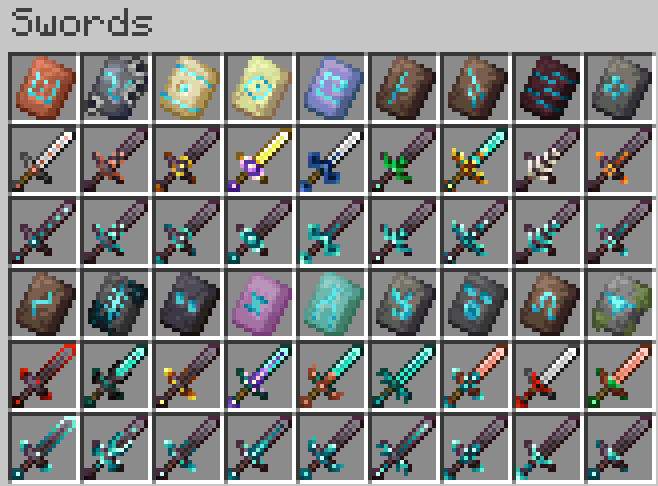
- Armor trims work on tools on the server. Use them to trim all your weapons including Bows, Crossbows, Spears, and even Maces!
- A Full preview of the tools can be found at https://modrinth.com/datapack/stks-tool-trims/gallery.
Player Titles
- Earn titles by reaching milestones in the server such as achievements completed, blocks mined, bosses defeated, players killed, and much more! Access the menu via
/btitles. - Supporters also gain access to custom titles that can be set in the menu.

Elytra Trims
- Trim your elytra the same way you trim your weapons and tools!

Golden Mob Plushies
- Golden plushies can be obtained as a rare drop from mob kills, which have a chance to hit a loot table with all 10.
- Mobs must be player killed, looting enchantment level doesn't affect their drop rates.
- It is possible and easy to get duplicates, as you're rolling from the same table every time.
- List of Plushies:
- Wolf
- Armadillo
- Axolotl
- Cat
- Cow
- Creeper
- Dolphin
- Goat
- Pig
- Rabbit
